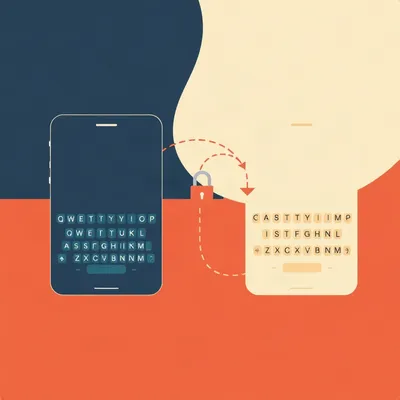
Here's a question. When you tap the microphone button on your phone's keyboard, what actually happens?
Not the marketing answer. The actual plumbing.
Daniel wrote in about this, and I want to read you the shape of what he's asking, because it's denser than it first sounds.
His observation is that voice-to-text keyboards are a mess. Most of the big keyboards that advertise voice input don't hand you off to the operating system's voice tool. They bundle their own transcription layer, closed source, running inside the keyboard itself. But in the purest architecture you can have two completely separate things: a dedicated keyboard, and a dedicated voice input method, triggered by the microphone button.
And he thinks that reveals something bigger. What we call a keyboard isn't one thing. It's a stack at the operating system level. Which is interesting, because a stack can be extended. And it's also a threat, because any layer that can transform your text can also read it. Keylogging is the obvious dark side.
But Daniel's white-hat question is the one he actually cares about. Could you build something that sits between your keystrokes and the operating system and silently, gracefully fixes your typos with very low latency AI? He points out that text expansion and macro utilities have been doing something like this for years. They must be intercepting somewhere. And yet they often don't show up in the input method list, which is confusing.
So: how is keyboard middleware actually implemented on Linux, Android, and Windows? How do those tools cope with the fact that users expect their text to appear instantly? And could a proactive correction layer that waits for a full sentence boundary replace the retrospective spell-checker entirely?

That last part is the interesting one. The rest is plumbing. That's a different class of problem.
Start with the plumbing anyway. Because I don't think people realize how much of it there is.
Right. So the reframe first, and then we walk the three platforms.
A keyboard is a pipeline. Four stages, roughly. Something generates key events, physical or on-screen. An input method layer receives them. That layer holds a composition buffer, which is uncommitted text, and then it commits finished text to whatever app has focus. The app never sees the intermediate states. It just gets the final string.
That's why you can swap keyboards at runtime and the app doesn't care. The app is talking to an interface, not to a specific keyboard.
And the composition buffer is the piece people don't know about.
It's the whole trick. That underlined word you're still typing, the one autocorrect is hovering over, that's uncommitted. It only becomes real text when you hit a word boundary or press space or accept a suggestion. Everything interesting happens in that gap.
So the three platforms.
Android, Linux, Windows. And they differ, which is why Daniel asked about all three. Android treats the input method as a first-class, sandboxed, replaceable system component. Linux is split down the middle between an old protocol and a new one. Windows has a legacy layer, a modern layer, and then a completely separate hook mechanism that most of the tools you're thinking of actually use.
Which is the answer to his confusion about why text expanders don't show up as input methods.
Because they're not input methods. They're hooks. Different animal entirely.
Let's do Android properly, because that's where Daniel started.
Android's input method framework is well designed, and I say that as someone who complains about most things. The core class is InputMethodService. A keyboard app implements that. The system binds to it as a service when a text field gets focus. It's a bound service, not a floating overlay, which matters.
Bound to what?
To the text field. The system connects the input method to whatever is focused. The input method receives key events, and it returns committed text through an interface called InputConnection. That's the contract. The keyboard doesn't reach into the app. It hands text across a defined boundary.
And that's why you can switch keyboards mid-sentence.
Mid-word, even. The app has no idea. It asked for text, it's getting text, it doesn't care which service is producing it. The composition buffer belongs to the input method, so when you switch, the new one picks up from a committed state.
Now the composition buffer, properly. Because I think that's the load-bearing piece for everything Daniel's asking.
It holds uncommitted text. You type the letters t, e, h. Those aren't in your document yet. They're in the buffer, displayed with that underline, and the keyboard is running predictions over them. If you keep going and it becomes "the," it commits. If you type something that isn't a word, it stays uncommitted until you force it.
And autocorrect lives entirely in that window.
So does voice transcription. This is the part that connects to Daniel's question. When you dictate, the transcription engine doesn't have to write directly into your document character by character. It can stream partial results into the composition buffer, revise them as more audio arrives, and only commit when it's confident.
So the buffer is what makes revision possible at all.
Without it, you'd be watching text appear and then get rewritten in place, which is exactly what a bad voice keyboard feels like. With it, the revisions happen in a space the app can't see.
Okay. So now the two architectures Daniel described. Bundled transcription versus a dedicated voice input method.
A dedicated voice input method is its own InputMethodService. It registers with the system as a separate input method. When you tap the microphone button, what's actually happening is the system switching input methods or invoking a subtype. The keyboard steps aside and the voice service takes over.
Same gesture, completely different plumbing.
Completely. And that's the pure version. Clean separation. The keyboard does keys, the voice service does audio, they never touch each other's business.
And the bundled version?
The keyboard ships its own speech recognition model inside the app. It doesn't switch input methods at all. The microphone button is just a button. It starts recording, runs the audio through its own recognizer, and writes the result into the same composition buffer the typing path uses.
Why would a vendor do that? Because it's more work.
Four reasons, and they're all good ones from the vendor's perspective. Latency, because you're not round-tripping to a third-party service. Control, because you own the model and can tune it. Data, because the audio passes through your infrastructure and you can train on it. And independence, because you're not depending on the operating system vendor's voice input method being present, or being good, or being available in the user's language.
That last one is the honest one.
It's the most honest one. If you're shipping a keyboard in forty languages, you cannot wait for the platform to have a decent recognizer in all forty. You build your own or you don't ship.
And the closed-source part is a product decision as much as a technical one.
It's entirely a product decision. There's no technical reason a bundled recognizer has to be closed. It's closed because the model is the asset.
Linux.
Linux splits. X11 has XIM, the X Input Method protocol, which is old and awkward. It was designed for a world where input methods were a niche concern and it shows. The client app and the input method negotiate through the X server, and the protocol is clunky enough that a lot of modern toolkits just bypass it.
Bypass it how?
They implement input methods inside the toolkit itself. GTK and Qt both have their own input method modules. So on X11 you have this situation where the "system" input method might be entirely ignored by the app you're typing into.
Which is a mess.
It's a mess. Wayland is the fix, and it's a real fix. The text-input protocol makes the compositor the mediator. The client app tells the compositor "I have a text field focused," the compositor connects it to an input method process, and the input method is a first-class citizen in the architecture rather than a hack bolted onto the side.
First-class how?
It's a separate process with a defined protocol. It can be swapped, it can be sandboxed, it can be written by anyone. Architecturally it's the cleanest of the three platforms. The problem is maturity. The protocol has taken a long time to settle down and different compositors implement different versions of it, so in practice it's still rougher than the design deserves.
That's a recurring theme with Wayland.
It's the recurring theme with Wayland. Beautiful design, slow delivery.
Windows.
Windows has three layers, and this is where Daniel's confusion about text expanders gets resolved. The legacy layer is IMM32, the Input Method Manager. That's what old-school input methods for Chinese, Japanese, Korean use. It's been around since the nineties and it still works.
And the modern layer?
TSF. Text Services Framework. That's the replacement, and it's what a proper modern input method registers with. If you write an input method for Windows today, you write a TSF text service. And if you do, you appear in the language bar. Users can see you, switch to you, configure you.
Which is not what text expanders do.
Which is not what text expanders do. Text expanders and macro tools overwhelmingly use SetWindowsHookEx with the WH_KEYBOARD_LL flag. That's a low-level keyboard hook. It sits below the input method layer entirely. It sees raw key events before they've been through any input method processing.
So it's not an input method at all.
It's not an input method. It's a hook. That's why it doesn't appear in the language bar. It's not registering as a text service, it's registering as an observer of the keyboard stream. It watches for a trigger pattern, and when it sees one, it synthesizes replacement input.
Synthesizes how?
It injects keystrokes. It sends a backspace sequence to delete what you typed, then sends the expansion. From the app's perspective, it just looks like you typed very fast and then corrected yourself.
That's a different mechanism.
It's a completely different mechanism, and it has completely different properties. A hook sees everything, including passwords, including keystrokes in apps that think they're secure. And it can inject into anything. That's the power and that's the problem.
Linux equivalents?
On X11 you can grab keys with XGrabKey, which lets a tool intercept specific combinations. Or you go lower and use evdev and uinput, which is reading from the kernel input device directly and writing back a virtual device. That's the level where you're below the display server entirely.
And Android?
Android is the interesting one, because you mostly can't do this. There's no supported hook API. A third-party app cannot observe keystrokes system-wide. So text expansion on Android either lives inside the keyboard itself, where it has legitimate access to the composition buffer, or it uses Accessibility Services, which is a completely different permission model with a big scary consent dialog.
So the platform that's most locked down forces the tool inside the keyboard.
And that's not an accident. It's the security model working as designed.
So that's the stack on all three platforms. Which means the interesting question is what happens when you try to insert yourself into it.
And specifically, what happens when you insert yourself into it and then take your time.
The latency problem.
The latency problem. This is the real constraint and it's worth being precise about it. When you press a key, you expect to see the character. Not eventually. Now. And "now" in perceptual terms is somewhere in the tens of milliseconds. Under about a hundred milliseconds and it feels instantaneous. Past about two hundred and it feels laggy.
And a correction layer has to fit inside that budget.
Or break it. Those are the only two options. And that gives you exactly two architectural strategies.
Go.
Strategy one: transform after commit. The text lands in the app, and then something reaches in and fixes it. That's what autocorrect does when it changes a word after you've already moved on. That's what retrospective spell-check does. It's fast, because nothing is blocking, but it's jarring, because you've already seen the wrong version.
And strategy two.
Strategy two: hold the text in the composition buffer and transform before commit. Now nothing lands until you've decided it's ready. That's slower, because the user is waiting, but it's smoother, because they never see the wrong version.
And Daniel's hypothetical AI layer is strategy two.
It has to be. If you want to catch a typo before the user sees it, you have to be holding the text when the typo exists. Which means you're in the buffer. Which means you're adding latency.
How much latency, concretely?
Depends on the model. A small local model doing word-level correction can run in single-digit milliseconds on modern hardware. That's invisible. But the moment you want context, the moment you want to look at a whole sentence, you're looking at tens of milliseconds minimum and probably more.
And you're looking at a whole sentence why?
Because that's where the interesting corrections are. Word-level correction catches spelling. Sentence-level correction catches things word-level never sees. Subject-verb disagreement. The wrong homophone in context, where "their" and "there" are both valid words and only the sentence tells you which one is right. A dropped negation, where you typed "I can go" and meant "I can't go" and the whole meaning inverts.
That last one is not a typo.
That last one is the opposite of a typo. It's a semantic error that produces perfectly valid text. No spell-checker on earth catches it. A sentence-level model might.
So it's a different class of correction entirely.
It's a different class. And that's the interesting white-hat case, and it's also where the whole thing gets dangerous, because a model that can fix "I can go" into "I can't go" is a model that is rewriting your meaning.
Which is a much worse failure than a red squiggle.
Much worse. A bad spell-check suggestion is annoying. A bad sentence-level rewrite is you sending an email that says the opposite of what you meant, and you might not notice.
So why hasn't this replaced spell-check?
First, retrospective spell-check is cheap and non-blocking. It costs nothing to run after the fact and it never makes you wait. Second, and this is the bigger one, users don't trust it. And they're right not to. The failure mode of proactive correction is silent and semantic. The failure pattern of a red squiggle is visible and trivial.
You'd rather see the mistake.
Everyone would rather see the mistake. That's the whole thing.
Which lands us on the privacy question, and I want to be careful here because it's easy to be lazy about it.
Be careful then.
Any layer that sees your keystrokes before they commit is, by construction, a keylogger. That's not a criticism. That's a definition. The mechanism that lets a correction layer fix your typo is the same mechanism that lets it read your password.
There is no architectural difference.
None. Zero. The code path is identical. You observe the keystroke stream, you decide what to do with it. Fixing a typo and exfiltrating a credential are the same operation with different outputs.
That's the uncomfortable point of the whole episode, and I don't think there's a clever way around it. You can't design a correction layer that can see your typos but can't see your passwords. The typo and the password arrive through the same channel.
Grammarly is the canonical example.
Grammarly is the canonical example because it's honest about what it is. It observes everything you type. That's the product. It has to, because it's checking your writing, and your writing is everything. And the same observation layer that catches your comma splice could, in principle, catch your bank login.
And the question is what stops it.
Policy and trust. That's it. There's no architectural guarantee. What you can do is constrain where the observation happens. Is the model local, so the text never leaves the machine? Is the buffer encrypted at rest? Who holds the keys? Can the vendor read the stream? Those are the real questions, and they're all answerable, but none of them are answered by the architecture itself.
So the white-hat case and the black-hat case are the same piece of code.
Same piece of code. Different policy. And that's not a flaw in the design, it's a property of the position. Anything sitting between your fingers and the screen is in a position of trust. That's what the position is.
Which is exactly what Daniel was poking at.
It's what he was poking at, and I think the honest answer is that the trust is unavoidable and the only question is how you make it legible.
Legible how?
Legible in the sense that the user can see what's happening. Which is a design problem, not a cryptography problem.
I want to go back to the latency thing for one more beat, because I think there's a version of this that actually works and I want to say what it is.
Go.
The reason proactive correction hasn't replaced spell-check isn't that it's impossible. It's that the trade is bad right now. You're asking the user to accept latency in exchange for corrections they didn't ask for, delivered by a model they can't inspect.
That's a bad trade.
It's a terrible trade. But the trade changes if the model gets fast enough that the latency is invisible, and if the corrections are good enough that the user wants them. And the second one is the hard part, because the corrections have to be right, and being right about meaning is much harder than being right about spelling.
There's a version of this that's already deployed and nobody calls it AI. Medical dictation systems do sentence-level correction. They buffer, they run a language model, they commit. And they've been doing it for years, because the cost of a wrong drug name is high enough to justify the latency.
That's a good example.
It's the example that proves the point. Proactive correction works when the stakes justify the delay. It just hasn't been worth it for ordinary typing yet.
Yet.
Yet.
Hilbert: The indicator was a little green dot in the bottom right corner, and it flashed for about a quarter of a second.
Hilbert: I was doing data entry for a medical billing contractor out in the valley. Six weeks, maybe seven. The software had a smart correction layer, that's what the manual called it, and it rewrote procedure codes as you typed them. You'd key in a code, and if it didn't match anything in the payer's list, it would silently swap it for the nearest valid one.
Hilbert: I spent a month thinking I was losing my mind. I'd type a code, look up, and the code on screen was not the code my fingers had typed. Not a typo. A different valid code. Correctly formatted, properly padded, sitting there like it had always been there.
So the correction was invisible.
Hilbert: The correction was invisible. There was a green dot. Nobody in that office knew what it meant. I asked the supervisor, she said it was probably a connection indicator. I read the manual on a slow Tuesday and found out.
And that was worse than the delay.
Hilbert: The delay I could live with. The delay was maybe a third of a second and you got used to it. What I couldn't live with was not knowing whether the thing on the screen was what I had put there. I'd rather see the wrong code appear and then watch it get fixed. At least then I know the machine is doing something. Silently appearing right is worse than visibly being wrong.
That's the visibility problem exactly.
Hilbert: I don't know if it's a problem. I know I quit after seven weeks and took a job driving a van for a florist, which paid less and I liked more.
There's something in that.
Hilbert: There's a lot in it. Anyway, I've got to move a chest freezer before it gets dark, so.
The thing I keep circling back to is that Hilbert's green dot is the whole design question in miniature. The correction layer was present, it was active, and it was completely opaque to the person it was correcting.
And the fix isn't technical. The fix is a light that means something.
It's a light that means something and a manual somebody actually reads.
One thing that didn't make it into the main discussion, and it's the detail I keep thinking about. On Windows, the low-level keyboard hook has a timeout. If your hook handler doesn't return within a certain window, the system just removes your hook. It assumes you've hung.
Which means the correction layer has a hard deadline imposed by the operating system, not by the user's patience.
Right. The OS is enforcing the latency budget whether you like it or not. Which is a nice little metaphor for the whole episode.
The stack has opinions about how long you're allowed to think.
So here's the open question. If a correction layer between your keystrokes and your screen is inevitable, and I think it probably is, what does a trustworthy version actually look like? Visible? Local? Opt-in? All three? None of the above?
And the pressure is only going one direction. On-device models keep getting smaller and faster, so the latency argument against proactive correction keeps weakening. Which leaves the privacy argument as the only one still standing.
Every layer between your fingers and the screen is a place where someone could be listening.
And also a place where someone could be helping. Same layer. Same code. Different policy.
That's the episode. Thanks to Hilbert Flumingtop for producing, and for the chest freezer update.
This has been My Weird Prompts, the human-AI collaboration podcast. If you want to send us something, email us at show at my weird prompts dot com.
We'll be back soon.
See you then.